There are many coding agents, but this one is mine.

Build your own harness.

Ready to go.
Built to extend.
Knows how to build itself.

QR code for the slide deck URL

What is an “agent harness”?

  • Deterministic code + engineered prompts around the model
  • The set of abstractions which transforms IO machine into “agent”

In Pi, the default tool belt is read, write, edit, and bash.
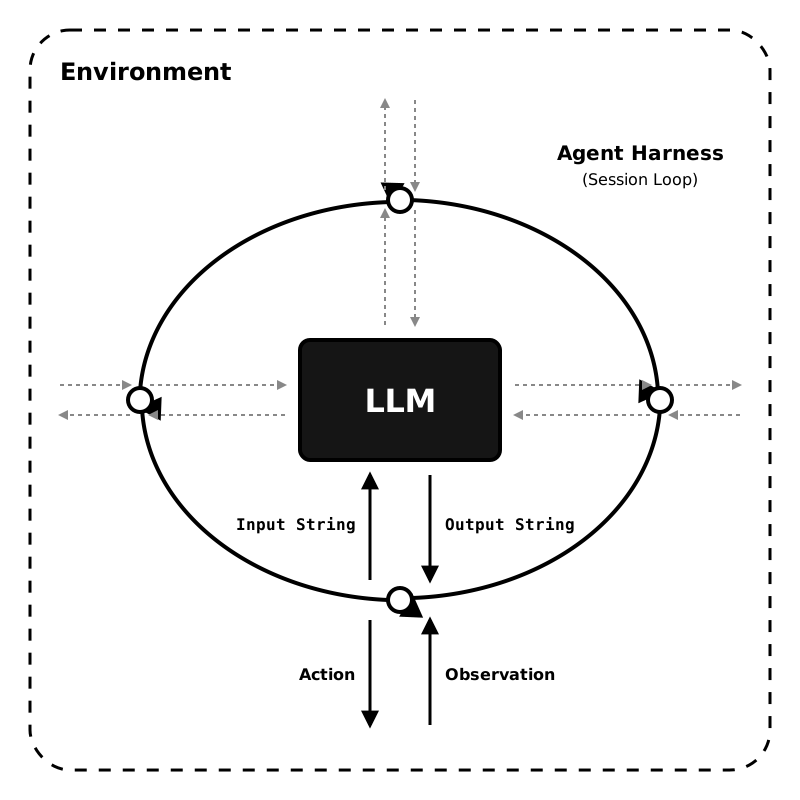
Diagram of an agent harness session loop between environment and LLM

What is harness engineering?

Definition

  • Designing the system around the model
  • Shaping how the agent sees, acts, and fits your workflow
  • More than prompting: tools, UX, memory, constraints, extensions

Why Pi matters

  • Small core of strong defaults
  • Extensions as first-class primitive
  • Install or write the missing piece
  • Learn it all, as you go

Pi’s modes

Same harness, four different surfaces.

Interactive

TUI for humans

Editor, chat history, sessions, commands, model switching.

pi

Print / JSON

CLI for scripts

One-shot output, or stream every event as JSON lines.

pi -p "..."
pi --mode json "..."

SDK

Embed the agent

Use the same session engine directly from Node/TypeScript.

createAgentSession()

RPC

Process integration

Headless JSONL protocol over stdin/stdout for non-JS IDEs and other apps.

pi --mode rpc

Compose a Pi for one job

A custom session can be just a Bash alias.

alias researcher='pi \
  --tools read,grep,find,ls \
  --extension ~/.pi/agent/extensions/fetch-content.ts \
  --extension ~/.pi/agent/extensions/web-search.ts \
  --no-session'
Read-only researcher

Same Pi, different affordances

  • No write or edit
  • Adds research extensions
  • Easy to launch, easy to share

Aliases are jobs.* Presets are states.

A preset is a named bundle of model, thinking, tools, and instructions.

What they are

Switchable workflow shapes inside Pi

  • Start with --preset plan
  • Switch later with /preset
  • Define globally or in .pi/presets.json
What they’re for

Plan → implement → review

  • Aliases launch a role
  • Presets express a state transition
  • CLI flags still override when needed

*Or whatever you want them to be. You know the Shell.

Tiny example extension:
Claude-only prompt injection

export default function (pi) {
  let claudePrompt;

  pi.on("model_select", async ({ model }) => {
    claudePrompt = model.id.includes("claude")
      ? "Seek existing windows for this shootout before blasting new holes, cowboy."
      : null;
  });

  pi.on("before_agent_start", async (event) => {
    if (!claudePrompt) return;
    return { systemPrompt: `${event.systemPrompt}\n\n${claudePrompt}` };
  });
}
What the heck?

Prompt logic can follow the active model

  • model_select updates extension state
  • before_agent_start injects per-turn
  • No Claude, no Claude-specific system prompt

Configuration is part of the software

Not one global agent. Many deliberately-shaped Pis.

Choose the scope
  • Per-user defaults
  • Per-project files and extensions
  • Per SDK call and resource loader
  • Per RPC exchange
  • Per alias / preset / command line
Engineer brain

Dependency injection for the harness

Model choice, tool belt, prompts, auth, and UI are not “the product.” They’re parameters you can bind differently for each repo, team, or workflow.

Pi breaks the consumer-software mindset

Consumer question

“Does it have my feature?”

  • their plan mode
  • their permission UX
  • their auth assumptions
  • their workflow opinions
Harness question

“How should this work here?”

  • compose the tools
  • inject the context
  • build the missing extension
  • make the workflow yours

A customization ladder

1

Text files

AGENTS.md, SYSTEM.md, prompts, settings.

2

Skills

Reusable instructions for focused capabilities and workflows.

3

Extensions

Tools, commands, UI, state, event hooks, custom providers.

4

SDK / RPC

Embed or drive the harness from your own application.

And yes, you can share it

pi install npm:@your-org/pi-team-tools
pi install git:github.com/your-org/pi-workflows
pi list
Pi packages

Ship prompts, skills, extensions, themes

Team conventions can be versioned, installed, reviewed, and evolved like any other dependency.

Pi is not trying to be the default for everyone

Many agent tools

Opinionated tools for broad audiences

That can be great. Strong defaults, polished workflows, faster onboarding.

Pi’s bet

Specialize the harness to the work

Per repo. Per team. Per model. Per workflow. Less “accept the featureset,” more “shape the agent around the environment.”

Setup

Install

brew install pi-coding-agent

Then run pi.

OAuth

/login

Sign into Claude, ChatGPT Codex, Copilot, Gemini CLI, or Antigravity from interactive mode.

Credential store

~/.pi/agent/auth.json

Stores API keys and OAuth tokens. /logout clears them. OAuth tokens auto-refresh.

Other options

Env vars or custom auth path

ANTHROPIC_API_KEY, OPENAI_API_KEY, or AuthStorage.create("/tmp/my-app/auth.json").

Resolution order: --api-keyauth.json → environment variable.